
TUTORIALS
Getting started with Embroidery Studio: your first design, step by step
Full disclosure: I'm the developer. I built Embroidery Studio, so this walkthrough is written by the person who made it.
Open the workspace
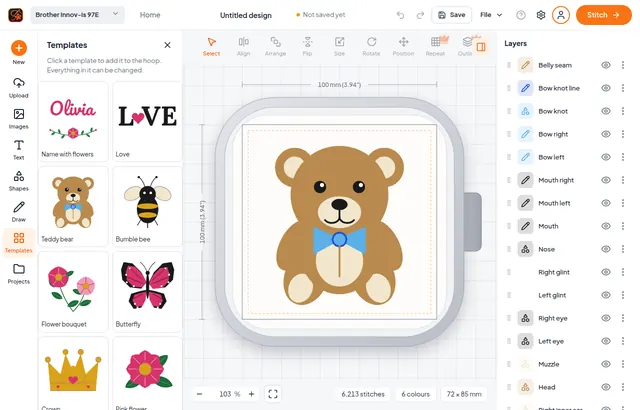
Go to /studio and the design workspace opens in your browser. You don't need to install anything to try it. Take a minute to look around: the design area is in the middle, and your tools sit around it.
- Pick your machine's hoop size first, so you design inside the area you can actually stitch.
- Look through the templates for a starting point if you'd rather not begin from a blank page.
- Sign in if you want your designs kept safe and available on any device. An account is optional for trying things out.
Create your first design
Start small. A single word or one simple shape is plenty for a first stitch-out.
- Add some lettering, a shape, or a picture to turn into stitches.
- Adjust the size, and choose the stitch type that suits it.
- Choose your thread colours.
- Preview the stitches before you save anything.
The preview shows the stitches the way the machine will sew them, so you can catch problems on screen instead of on fabric.
Export and stitch
When you're happy with the design, export it in the file format your machine reads. Brother machines read PES, Janome reads JEF, and DST is understood by many other machines. Not sure which you need? The file format guide lists every machine side by side.
- Choose the right file format for your machine.
- Check the stitch count and the size.
- Save the file and copy it to your machine.
- Stitch a small test on scrap fabric first.
FAQ
Do I need to install anything?
No. Embroidery Studio runs in your browser. There is also a Windows download if you prefer an app.
Which file formats can I export?
PES, DST, EXP, JEF, VP3 and XXX.
Is it free?
There is a free version plus optional Plus subscriptions. Some features need a paid plan, so it isn't completely free for everything.
Can I open a stitch file I already have?
Yes, you can place and combine it with other designs, but you can't edit its individual stitches. The free file viewer is a quick way to look at one first.
What's next
Open /studio and try a first design, then come back to the help centre if you get stuck. More posts will follow here.